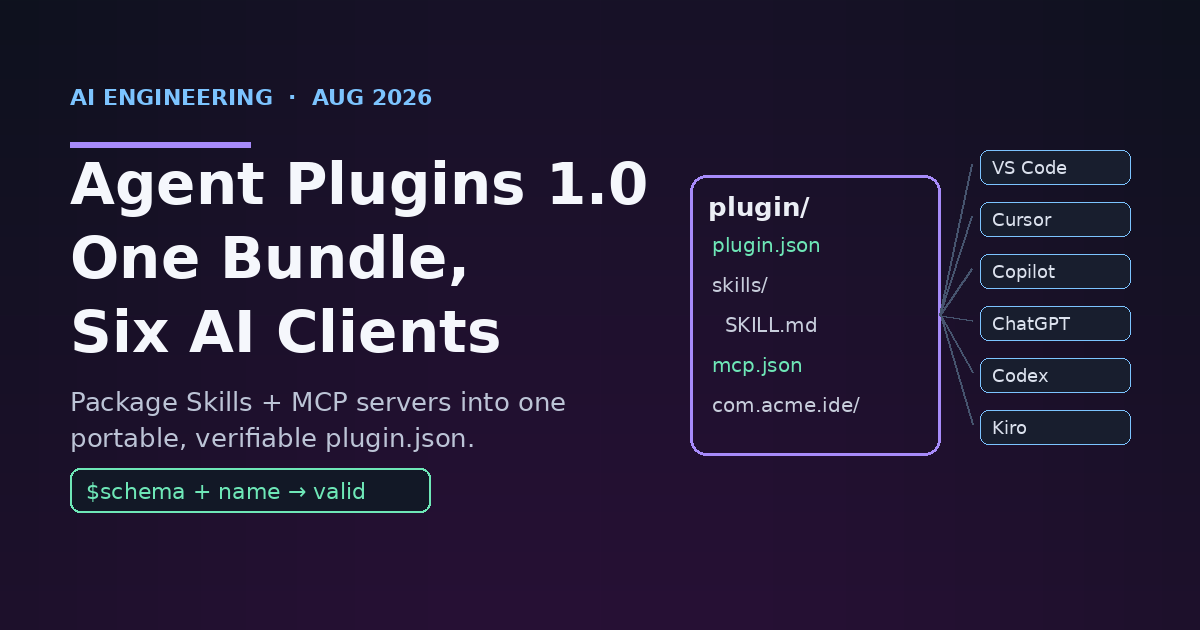
Agent Plugins 1.0: One Bundle, Six AI Clients
Summary
Package your Agent Skills and MCP servers into one portable plugin that runs across six AI clients.
Agent Plugins 1.0: Package a Skill Once, Run It in Six Clients
On August 6, 2026 a Technical Steering Committee made up of maintainers from Amazon, Cursor, Microsoft, OpenAI and Vercel published Agent Plugins 1.0.0, an open, vendor-neutral format for packaging Agent Skills and MCP servers into a single portable plugin. Google announced the same day that it is joining the group as a Core Maintainer. That is an unusually wide coalition for a spec that fits on a napkin, which is exactly why it went straight to the top of every developer feed.
The problem it solves is one you have probably hit. You write a skill, you write an MCP server to go with it, and together they do one useful thing. Then you try to ship that pair to a second agent client and discover the skill is fine, the server is fine, but the wrapper around them is not: different directory layout, different manifest metadata, a different shape for the MCP config. So you fork the bundle and maintain two copies of components that were never actually different. Agent Plugins standardizes that wrapper and nothing else.
By the end of this guide you will know exactly what a plugin is, write a real one by hand, scaffold it with a short Python script, and validate it against the spec's normative rules with a second script you can drop into CI. Every rule below is taken from the published specification, and all the code here was run before publishing.
What you need
- Python 3.9+ (the scripts use only the standard library).
- A working idea of what an Agent Skill is (a
SKILL.mdfile with YAML frontmatter plus optional scripts) and what an MCP server is (a tool/data process an agent talks to). - An agent client that reads the format if you want to install the result: VS Code, Cursor, GitHub Copilot, ChatGPT & Codex, or Kiro.
The mental model: packaging, not a new runtime
The single most common misreading of this launch is that a new protocol has arrived to compete with MCP. It has not. Agent Plugins sits on top of formats that were already portable and changes neither of them. It is easiest to think in four layers, only one of which is new:
| Layer | Job | Who owns it |
|---|---|---|
| Find | Discover what is available for a task | Agentic Resource Discovery |
| Describe | Say what a resource is and where it came from | AI Catalog |
| Package | Bundle components so they travel together | Agent Plugins (new) |
| Run | Execute the instructions and tools | Agent Skills + MCP |
Agent Plugins occupies the Package row and only that row. It defers the entire skill format to the Agent Skills specification and configures MCP servers using MCP's own transports. Nothing about how a skill or a server is written changes. That restraint is the whole design: keep the shared box small so every client can still innovate on the parts that are genuinely theirs.
Anatomy of a plugin: a directory, not an archive
A plugin is a directory. Not a .zip, not a registry bundle, a plain directory, so it stays inspectable with ls, cat and git diff and editable in place. Component locations are fixed and cannot be overridden by the manifest, so a client never has to guess where anything lives:
weekly-report-plugin/
|-- plugin.json          # the manifest (required)
|-- skills/              # optional; each subdir with a SKILL.md is one skill
|   `-- weekly-report/
|       |-- SKILL.md
|       |-- scripts/
|       `-- references/
|-- mcp.json             # optional; MCP servers, explicit type per entry
`-- com.acme.ide/        # optional; a client's private extension namespace
Four things can appear at the root. plugin.json is the manifest and is the only required piece. skills/ holds skills, one per immediate subdirectory. mcp.json declares MCP servers. Any reverse-domain directory such as com.acme.ide/ is an escape hatch a single client owns for its own extensions; clients that do not recognize it ignore it. If a fixed location is simply absent, a conformant client loads what is there and moves on rather than erroring.
Step 1: Write plugin.json
The manifest schema is closed: exactly ten top-level fields are permitted and only two are required. The required pair is $schema (which must be exactly the canonical 1.0.0 schema URL) and name. The other eight are version, description, author, homepage, repository, license, keywords and extensions. Anything else is a validation error, not an ignored extra.
{
  "$schema": "https://agent-plugins.org/schemas/1.0.0/plugin.schema.json",
  "name": "weekly-report",
  "version": "0.1.0",
  "description": "Turn the team's raw metrics into the Monday summary.",
  "author": "Data Platform Team",
  "license": "Apache-2.0",
  "keywords": ["reporting", "analytics"]
}
The name field has real rules: 1 to 64 characters, lowercase alphanumerics separated by single hyphens or dots, starting and ending on an alphanumeric, with no doubled -- or .. sequences. So weekly-report and reports.db are valid; Weekly-Report, a--b and -report are not.
Step 2: Add a skill under skills/
Each skill is an immediate subdirectory of skills/ that contains a SKILL.md. There is no recursive search: a SKILL.md nested two levels deep is not a skill. The file format itself belongs to the Agent Skills spec, YAML frontmatter with a name and description, then Markdown instructions, optionally alongside scripts/ and references/ folders:
---
name: weekly-report
description: >-
  Query the reporting database and turn the results into the weekly
  summary the team reads. Use when asked for the Monday metrics recap.
---

# Weekly report

1. Call the `run_report` tool on the `reports-db` MCP server with the
   ISO week number to fetch raw rows.
2. Group by channel, compute week-over-week deltas.
3. Render the `references/summary_template.md` structure and fill it in.

Keep it to one screen. Lead with the single number that moved most.
The description is the part the agent reads to decide when to load the skill, so make it specific about the trigger. The body is what it reads once it has decided to.
Step 3: Declare MCP servers in mcp.json
All MCP servers live in a single mcp.json at the plugin root, and every entry must carry an explicit type. This is the spec deliberately removing a footgun: clients no longer infer a transport from the shape of a config object. Three transports are named, stdio, streamable-http, and sse (the deprecated legacy HTTP+SSE transport). A conformant client must support at least one of stdio or streamable-http and should support both; sse is optional.
{
  "mcpServers": {
    "reports-db": {
      "type": "stdio",
      "command": "python",
      "args": ["-m", "reports_mcp", "--root", "${PLUGIN_ROOT}"]
    },
    "metrics-api": {
      "type": "streamable-http",
      "url": "https://metrics.internal.example/mcp"
    }
  }
}
Notice ${PLUGIN_ROOT} in the args. The spec reserves exactly two variables, ${PLUGIN_ROOT} and ${PLUGIN_DATA} (a client-managed writable directory that persists across updates), and a client that launches plugin subprocesses must provide both. Expansion is single-pass and applies only to args, env values and cwd, never to command itself.
Step 4: Scaffold the whole thing with a script
Typing the tree by hand gets old. This stdlib-only script writes a complete, valid plugin, and it is the exact script used to produce the example in this guide:
#!/usr/bin/env python3
"""Scaffold a valid Agent Plugins 1.0.0 plugin directory (stdlib only)."""
import json, pathlib, textwrap

ROOT = pathlib.Path("weekly-report-plugin")
SCHEMA = "https://agent-plugins.org/schemas/1.0.0/plugin.schema.json"

def w(path, text):
    path.parent.mkdir(parents=True, exist_ok=True)
    path.write_text(textwrap.dedent(text).lstrip("\n"), encoding="utf-8")

# 1. Root manifest: only $schema + name are required.
w(ROOT / "plugin.json", json.dumps({
    "$schema": SCHEMA,
    "name": "weekly-report",
    "version": "0.1.0",
    "description": "Turn the team's raw metrics into the Monday summary.",
    "author": "Data Platform Team",
    "license": "Apache-2.0",
    "keywords": ["reporting", "analytics"],
}, indent=2) + "\n")

# 2. A skill lives at skills/<name>/SKILL.md (Agent Skills is the source of truth)
w(ROOT / "skills" / "weekly-report" / "SKILL.md", """
    ---
    name: weekly-report
    description: Query the reporting DB and write the weekly summary.
    ---

    # Weekly report
    1. Call run_report on the reports-db MCP server for the ISO week.
    2. Group by channel, compute week-over-week deltas.
    3. Fill in references/summary_template.md and keep it to one screen.
""")

# 3. MCP servers: one file at the root, explicit `type` on every entry.
w(ROOT / "mcp.json", json.dumps({
    "mcpServers": {
        "reports-db": {"type": "stdio", "command": "python",
                        "args": ["-m", "reports_mcp", "--root", "${PLUGIN_ROOT}"]},
        "metrics-api": {"type": "streamable-http",
                         "url": "https://metrics.internal.example/mcp"},
    }
}, indent=2) + "\n")

print("Created plugin at:", ROOT.resolve())
for p in sorted(ROOT.rglob("*")):
    print("  " + str(p.relative_to(ROOT)) + ("/" if p.is_dir() else ""))
Running it prints the resulting tree:
$ python3 scaffold.py
Created plugin at: /work/weekly-report-plugin
  mcp.json
  plugin.json
  skills/
  skills/weekly-report/
  skills/weekly-report/SKILL.md
Step 5: Validate against the normative rules
The spec ships no official validator (testing and validation are named as deferred, future work), so here is one that enforces the rules we have covered: required fields, exact $schema, the closed field set, the name grammar, one skill per immediate skills/ subdirectory, an explicit transport type on every MCP entry, and path containment inside the plugin root. It exits non-zero on failure, so it drops straight into CI:
#!/usr/bin/env python3
"""Validate a directory against the Agent Plugins 1.0.0 normative rules."""
import json, re, sys, pathlib

SCHEMA = "https://agent-plugins.org/schemas/1.0.0/plugin.schema.json"
ALLOWED = {"$schema", "name", "version", "description", "author",
           "homepage", "repository", "license", "keywords", "extensions"}
NAME_RE = re.compile(r"^[a-z0-9]$|^[a-z0-9](?:[a-z0-9]|[-.](?![-.]))*[a-z0-9]$")
TRANSPORTS = {"stdio", "streamable-http", "sse"}

def validate(root):
    errors, warnings = [], []
    mf = root / "plugin.json"
    if not mf.exists():
        return ["plugin.json is missing at the plugin root"], []
    try:
        m = json.loads(mf.read_text())
    except json.JSONDecodeError as e:
        return [f"plugin.json is not valid JSON: {e}"], []

    for req in ("$schema", "name"):
        if req not in m:
            errors.append(f"plugin.json missing required field '{req}'")
    if m.get("$schema") != SCHEMA:
        errors.append("$schema must be exactly the canonical 1.0.0 schema URL")
    for k in m:
        if k not in ALLOWED:
            errors.append(f"unknown top-level field '{k}' (schema is closed)")
    name = m.get("name", "")
    if name and not (1 <= len(name) <= 64 and NAME_RE.match(name)):
        errors.append(f"name '{name}' breaks the naming rule")

    sk = root / "skills"
    if sk.is_dir():
        for c in sorted(sk.iterdir()):
            if c.is_dir() and not (c / "SKILL.md").exists():
                warnings.append(f"skills/{c.name}/ has no SKILL.md -> skipped")

    mc = root / "mcp.json"
    if mc.exists() and mc.is_file():
        for sid, cfg in json.loads(mc.read_text()).get("mcpServers", {}).items():
            t = cfg.get("type")
            if t is None:
                errors.append(f"mcp server '{sid}' has no explicit 'type'")
            elif t not in TRANSPORTS:
                errors.append(f"mcp server '{sid}' type '{t}' is not a known transport")

    root_res = root.resolve()
    for p in root.rglob("*"):
        try:
            p.resolve().relative_to(root_res)
        except ValueError:
            errors.append(f"path escapes plugin root: {p}")
    return errors, warnings

def main(argv):
    root = pathlib.Path(argv[1] if len(argv) > 1 else ".")
    errors, warnings = validate(root)
    for w in warnings: print(f"WARN  {w}")
    for e in errors:   print(f"ERROR {e}")
    if not errors:
        print(f"OK    {root.name}: valid Agent Plugins 1.0.0 package "
              f"({len(warnings)} warning(s))")
        return 0
    print(f"FAIL  {root.name}: {len(errors)} error(s)")
    return 1

if __name__ == "__main__":
    sys.exit(main(sys.argv))
Run against the plugin we built and against a deliberately broken one, it produces:
$ python3 validate.py weekly-report-plugin
OK    weekly-report-plugin: valid Agent Plugins 1.0.0 package (0 warning(s))

$ python3 validate.py broken
WARN  skills/orphan/ has no SKILL.md -> skipped
ERROR unknown top-level field 'color' (schema is closed)
ERROR unknown top-level field 'mcp' (schema is closed)
ERROR name 'Bad--Name' breaks the naming rule
ERROR mcp server 'db' has no explicit 'type'
FAIL  broken: 4 error(s)
The broken run is the useful one: it catches two illegal top-level fields, a bad name, and an MCP entry missing its type, and it warns rather than fails on an empty skill directory, mirroring the spec's rule that an invalid skill is skipped, not fatal.
Worked example: shipping across clients (and the transport trap)
The weekly-report plugin now bundles one skill and two MCP servers. Because it is a portable plugin, the same directory installs into VS Code, Cursor, GitHub Copilot, ChatGPT & Codex, and Kiro without a per-client rewrite. But 'portable' has one sharp edge worth internalizing before you advertise it.
At launch, four of the five client entries list all three transports. The ChatGPT & Codex entry lists only stdio and streamable-http, with no legacy sse. So a plugin whose server is sse-only is portable in name and broken in that one client. Our metrics-api server uses streamable-http, which every entry supports, so it travels cleanly. The rule of thumb: ship stdio or streamable-http, and treat sse as a fallback you never rely on alone.
Common pitfalls and gotchas
The $schema value is not decoration. It must match the canonical 1.0.0 URL exactly. VS Code, for instance, tells an Agent Plugins manifest apart from its own Copilot manifest (same plugin.json filename) purely by this string. Get it wrong and your plugin is silently read as a different format.
The manifest cannot relocate or inline components. There is no field to point skills/ somewhere else and no way to embed an MCP server definition inside plugin.json. If you catch yourself wanting one, you are fighting the format.
Secrets are explicitly out of scope, twice. The spec says do not put credentials in mcp.json header values or in env values, because those are visible package data. There is no OAuth block and no portable credential-reference field in v1. Authorization is entirely client-managed; your plugin should reference a secret the client injects, never carry one.
Install is an implicit trust decision. v1 defines no provenance, no signatures and no publisher-identity binding, and shipped clients (VS Code documents this) treat a plugin's MCP servers as trusted at install with no separate startup prompt. Since a plugin can launch processes on your machine, gate a third-party plugin the way you gate a new dependency: read the directory, check the publisher, keep a vendored internal copy rather than pulling from a marketplace at install time.
Do not over-package. If you are shipping a single MCP server to a single client, a bare mcp.json is still the simpler answer. A single skill does not need a plugin either. The format earns its keep only when components genuinely belong together and need to travel together.
Mind the maturity signals. The specification page is still labeled 'Working Draft', there is no git tag or GitHub Release behind the 1.0.0 label, and the version lives in the schema URL and document header rather than a release artifact. It is also not an Agentic AI Foundation project (MCP is). None of this makes it unusable, but pin to the schema URL, not to a tag that does not exist.
Quick reference
| Item | Rule |
|---|---|
| plugin.json | Required. Closed schema: 10 fields, only $schema + name required. |
| $schema | Must equal the canonical 1.0.0 schema URL exactly. |
| name | 1-64 chars, lowercase alnum, single - or . separators, no doubled -- or .. |
| skills/ | Optional. One skill per immediate subdir containing SKILL.md. No recursion. |
| mcp.json | Optional. One file at root. Explicit type on every server entry. |
| Transports | stdio, streamable-http, sse (legacy). Support >=1 of stdio / streamable-http. |
| Reserved vars | ${PLUGIN_ROOT}, ${PLUGIN_DATA}; expand only in args, env values, cwd. |
| Failure model | Bad component is skipped, not fatal. Independent components fail independently. |
| Secrets | Out of scope. Never embed credentials in headers or env. |
| Trust | No provenance in v1. Install = implicit trust. Review before installing. |
Next steps
- Add a conformant
plugin.jsonto a skill+server pair you already ship. It costs two fields and does not force you to drop any existing vendor format. - Drop
validate.pyinto CI so a bad$schema, name, or missing transport type fails the build instead of a user's install. - Audit your MCP servers' transports: move anything
sse-only tostreamable-httpbefore you call it portable. - Read the specification at agent-plugins.org and the Agent Skills spec it defers to for the full
SKILL.mdfield list.
Tutorial verified on Python 3.12; scaffold and validator scripts were executed before publishing. Spec details are from the Agent Plugins 1.0.0 specification and the founding maintainers' announcements (Google Developers Blog, Aug 6, 2026).
Comments
Be the first to comment
Found this useful?
Get new AI guides for builders by email. Free.
Join 3,604 newsletter subscribers.