AI & Machine Learning Freemium
AI Disturbance Overlay
Web Application 3.8/5 Web
What is AI Disturbance Overlay?
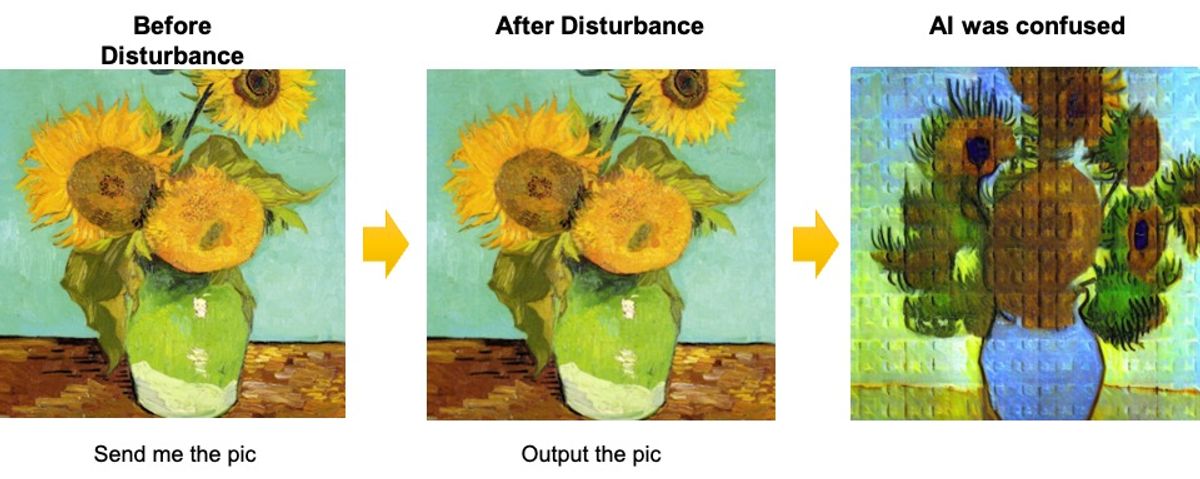
Protect your digital art from AI replication with unique, invisible textures and filters that disrupt AI models.
AI Disturbance Overlay protects digital art from unauthorized AI replication using adversarial example techniques. It applies nearly invisible textures and filters that disrupt AI model training while preserving human visual quality. The tool offers resistance to screenshots, compression, blurring, and other image manipulations. It is easy to use via browser upload and provides various subscription plans.
Key Features
AI Perception Blind Spot Protection
Resistance to Screenshot Attacks
Resistance to Image Processing Attacks
Advanced Anti-Interference Protection
Rapid Artwork Generation
Easy browser-based upload
Multiple protection levels
Customer support based on plan
Use Cases
Digital artists upload their artwork to apply invisible disturbances, preventing AI models from copying their unique style and protecting their creative work from unauthorized replication.
Illustrators use the tool to safeguard their online portfolios, ensuring that screenshots or compressed versions of their art remain protected against AI training.
Photographers apply disturbance overlays to their images before sharing on social media, disrupting AI's ability to learn their photographic style while keeping the visual quality intact for human viewers.
Graphic designers protect their commercial designs by generating protected versions that resist common image manipulations like blurring and noise injection, maintaining security across different platforms.
Art educators use AI Disturbance Overlay to demonstrate adversarial example concepts, showing students how subtle pixel changes can fool AI models while being imperceptible to humans.
Independent creators with existing online artworks apply the overlay to new pieces, shifting AI's perception of their style and reducing the risk of future mimicry even if previous works were scraped.
AI protectionart protectionadversarial examplesimage filteringdigital artcopyright protectionAI disturbancestyle theft prevention
Alternatives
Frequently asked questions
- What is AI Disturbance Overlay used for?
- AI Disturbance Overlay is used for Digital artists upload their artwork to apply invisible disturbances, preventing AI models from copying their unique style and protecting their creative work from unauthorized replication.; Illustrators use the tool to safeguard their online portfolios, ensuring that screenshots or compressed versions of their art remain protected against AI training.; Photographers apply disturbance overlays to their images before sharing on social media, disrupting AI's ability to learn their photographic style while keeping the visual quality intact for human viewers.; Graphic designers protect their commercial designs by generating protected versions that resist common image manipulations like blurring and noise injection, maintaining security across different platforms.; Art educators use AI Disturbance Overlay to demonstrate adversarial example concepts, showing students how subtle pixel changes can fool AI models while being imperceptible to humans..
- What are alternatives to AI Disturbance Overlay?
- Alternatives to AI Disturbance Overlay include Glaze, Nightshade. See the full ranked list of AI Disturbance Overlay alternatives on ContentBuffer.
Opens in a new tab on AI Disturbance Overlay website.
Comments
Subscribe to join the conversation...
Be the first to comment
Discover more AI tools like this
Get the best AI tools, news, and resources delivered weekly.
Join 3,568 builders reading daily.
Also get