Image Editing Freemium
Relight AI
Web Application 3.9/5 WebChrome extension
What is Relight AI?
AI-powered tool to change photo backgrounds and lighting with prompts. Free tier available.
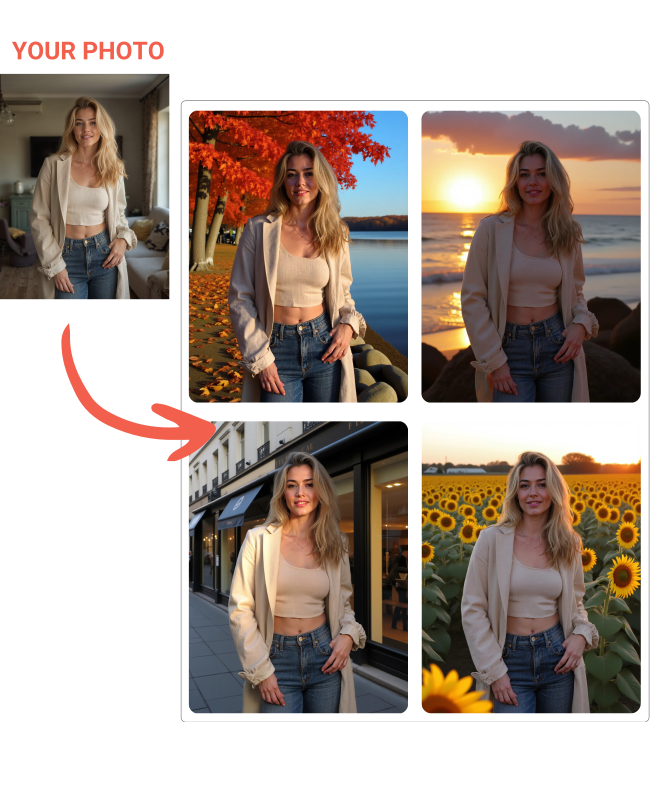
Relight AI is an AI-powered tool that lets you change photo backgrounds and adjust lighting using text prompts. It offers one-click background swapping, professional lighting effects, and supports various use cases like headshots, pet portraits, and travel photos. The tool is available as a web app and a Chrome extension for virtual try-on. It has a free tier with monthly tokens and paid subscription plans.
Key Features
One-click background change
AI-powered relighting
Prompt-based background description
Supports PNG, JPEG, WEBP up to 5MB
Chrome extension for virtual try-on
Magic upscaler (paid plans)
High quality photo output (paid plans)
Early access to new features (paid plans)
Use Cases
Professionals create polished headshots from casual selfies at home, saving time and money on studio sessions.
E-commerce sellers replace product photo backgrounds with clean or themed settings, boosting conversion rates without manual editing.
Travel enthusiasts generate realistic vacation photos from any location using text prompts, enabling creative storytelling.
Pet owners transform ordinary pet snapshots into heartwarming portraits, perfect for sharing on social media or gifts.
Online shoppers use the Chrome extension to virtually try on clothes from any website, reducing returns and improving fit confidence.
Social media managers quickly generate platform-specific images with consistent lighting and backgrounds, streamlining content creation.
Photographers experiment with different lighting setups on existing photos, exploring creative options without reshooting.
AI background changerphoto editingrelightingheadshot generatorpet portraitsvirtual try-onChrome extension
Alternatives
Frequently asked questions
- Is Relight AI free?
- Relight AI offers a free trial.
- What is Relight AI used for?
- Relight AI is used for Professionals create polished headshots from casual selfies at home, saving time and money on studio sessions.; E-commerce sellers replace product photo backgrounds with clean or themed settings, boosting conversion rates without manual editing.; Travel enthusiasts generate realistic vacation photos from any location using text prompts, enabling creative storytelling.; Pet owners transform ordinary pet snapshots into heartwarming portraits, perfect for sharing on social media or gifts.; Online shoppers use the Chrome extension to virtually try on clothes from any website, reducing returns and improving fit confidence..
- What are alternatives to Relight AI?
- Alternatives to Relight AI include Remove.bg, Adobe Photoshop, Canva. See the full ranked list of Relight AI alternatives on ContentBuffer.
Opens in a new tab on Relight AI website.
Comments
Subscribe to join the conversation...
Be the first to comment
Discover more AI tools like this
Get the best AI tools, news, and resources delivered weekly.
Join 3,568 builders reading daily.
Also get